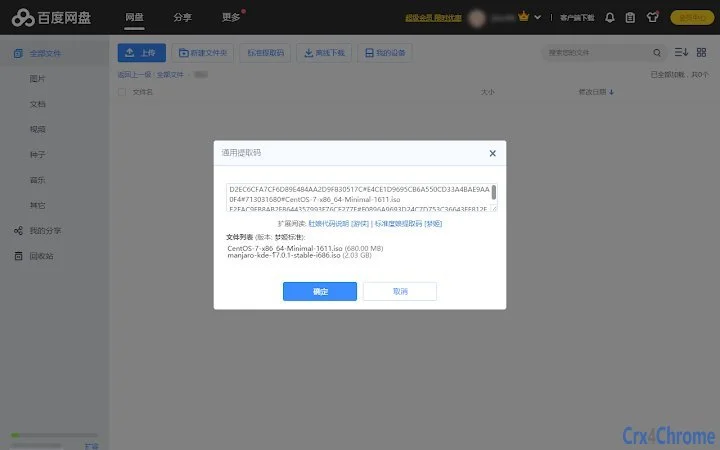

Enhanced Baidu Pan Batch Renamer & Universal Extractor
Overview
The software enhances the existing user interface of Baidu Netdisk by introducing advanced file management capabilities. Designed to streamline workflows for users who frequently manage large volumes of files, it addresses common pain points such as repetitive renaming tasks and unreliable share links. The tool enables batch renaming of selected files using customizable rules, significantly reducing manual effort.
It also introduces a feature for generating universal extraction codes, which aims to extend the lifespan of shared links—particularly useful for users who rely on long-term access to shared resources. The application is intended for individuals and professionals managing digital content, including students, content creators, and researchers. It operates as a desktop utility that integrates with the Baidu Netdisk ecosystem without altering core platform functions.
Real-world usage scenarios include organizing academic materials, managing media libraries, or preparing content for team collaboration. The developer did not provide additional background information.
Key Features & Capabilities
- Batch File Renaming: Select multiple files and apply consistent renaming rules in one action. Ideal for standardizing file names across folders or projects.
- Customizable Extraction Codes: Generate share links with user-defined extraction codes, including combinations of four digits, one Chinese character with one letter or number, or other specified formats.
- Universal Extraction Code Support: Designed to maintain link validity for most files, especially those not subject to platform-specific restrictions like modified educational videos.
- Integration with Baidu Netdisk UI: Functions as a companion tool that enhances the native interface without requiring changes to the core application.
- Desktop Application for Windows and Mac: Available as a lightweight desktop utility, ensuring accessibility across major operating systems.
These features support efficient file organization and improved sharing reliability. For example, users can rename a batch of downloaded lecture recordings with a single command, using a naming convention like “Lecture_01_2024.” Similarly, sharing a folder with a universal extraction code reduces the risk of link expiration, which is particularly beneficial in collaborative environments. The tool is designed to minimize user effort while maximizing consistency and access control.
User Interface, Workflow & Performance
The application features a clean, intuitive interface that aligns with the visual language of the Baidu Netdisk platform. Navigation is straightforward, allowing users to quickly access core functions such as batch renaming and code generation. The workflow is designed to be minimal and task-focused, with clear input fields and immediate feedback.
Users can select files, define renaming rules, and generate codes with minimal clicks. The developer did not specify resource usage details, so exact performance behavior remains unspecified. However, the application’s size of 5.8 MB suggests a lightweight footprint, which may contribute to efficient operation.
Stability and CPU/RAM behavior were not publicly documented. General software behavior patterns suggest smooth operation under typical usage conditions, though performance may vary depending on system configuration and file volume.
Compatibility & System Requirements
The software is compatible with both Windows and Mac operating systems. It supports the latest versions of these platforms as of its release date. The installation size is 5.8 MB, indicating a compact footprint.
The developer did not specify exact system requirements, including minimum RAM, processor speed, or disk space. Compatibility information was partially provided, but no details on hardware prerequisites were included. Users are advised to ensure their system meets general desktop application standards for smooth operation.
The application does not require administrative privileges for installation or execution.
Pros and Cons
Pros
- Efficient batch renaming reduces repetitive manual work.
- Customizable and universal extraction codes improve sharing reliability.
- Lightweight at only 5.8 MB, suitable for older or low-resource systems.
- Available for both Windows and Mac, offering cross-platform access.
- Free to use, with no cost barrier for individual or professional use.
Cons
- Exact performance and system requirements were not specified.
- Effectiveness may vary for files subject to platform-specific restrictions, such as modified educational content.
- Functionality is limited to Baidu Netdisk enhancements; not applicable to other cloud services.
- No official update history or changelog provided.
- Developer background and support channels are not disclosed.
FAQ Section
Is this tool compatible with both Windows and Mac?
Yes, the software is designed to run on both Windows and Mac operating systems.
Can I use this tool without an internet connection?
Yes, the application functions as a desktop utility and does not require constant internet access to perform batch renaming or code generation.
Is the software secure to use with my Baidu Netdisk account?
The tool operates as a UI enhancement and does not access or store user credentials. It works within the existing Baidu Netdisk environment without altering account data.
Does the software support automatic updates?
There is no publicly available information on automatic update functionality. Users should check for new versions manually.
What type of license does this software use?
The software is free to use and does not require a license key. It is distributed without cost and is intended for personal and professional use.
Final Thoughts
This desktop utility offers a practical solution for users seeking to improve their Baidu Netdisk experience through batch file management and more reliable sharing. Its ability to streamline renaming tasks and extend the validity of shared links addresses real challenges faced by frequent users. While some technical details remain unspecified, the tool’s lightweight design and cross-platform availability make it accessible and convenient.
It is particularly beneficial for students, educators, and content managers who handle large volumes of shared files. Despite limited transparency around system requirements and developer support, the free price point and clear functionality justify its use. For those looking to enhance productivity within the Baidu Netdisk ecosystem, this tool delivers tangible value.
Download Enhanced Baidu Pan Batch Renamer & Universal Extractor now.







